Chapter 14 · Part 3: Make it yours
Keep your own records
A restaurant is shared. A review belongs to the person who wrote it, and the group reads it. A visit is different again: it's a private note to yourself. We went on the 14th. Birthday shakes. Nobody needs to see it, and some people would rather nobody did.
In Chapter 8 you wrote that down as a rule: only the person who logged a visit can see it. This chapter makes the app keep that promise, including from you, the owner.
What counts as a good visit
A visit has two parts, a date and a note. Both come from a form, and anything that comes from a form can be wrong. Sometimes by accident, like typing 0026 for 2026. Sometimes on purpose. So before a visit is saved, the app checks it.
| What was sent | What happens |
|---|---|
| A real date in the past, and a note | Saved |
| No note | Saved. The note is optional. |
| February 31 | Refused. It isn't a date on the calendar. |
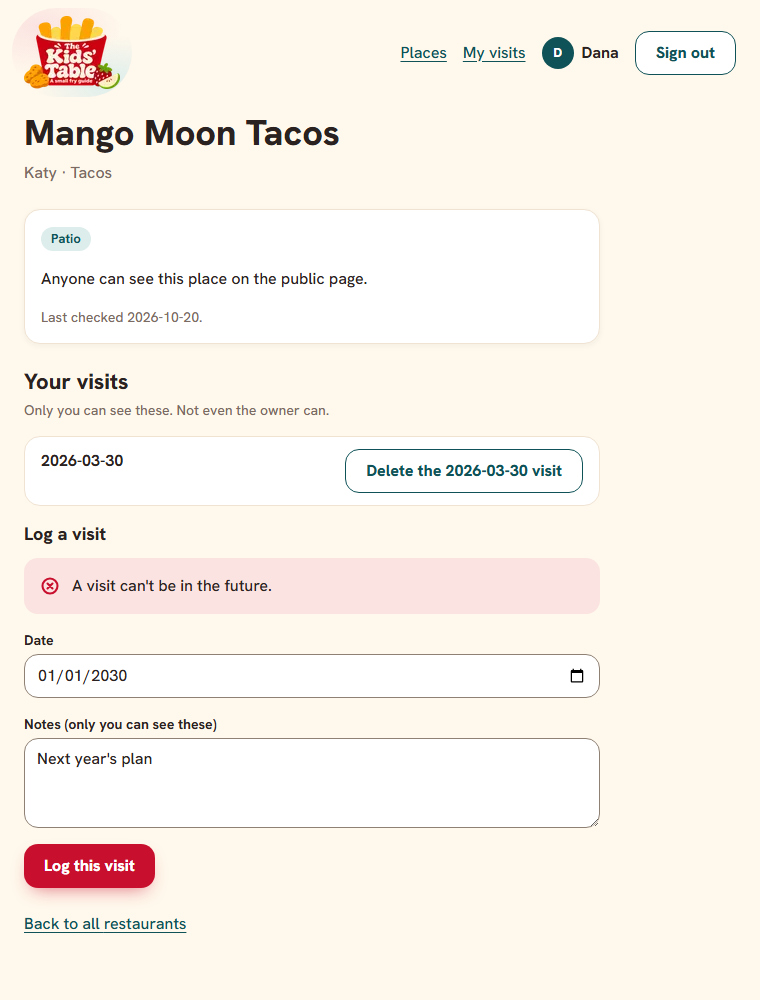
| A date more than a day ahead | Refused. A visit can't be in the future. (The note below explains the one day of slack.) |
| The year 26, or anything before 2000 | Refused. Almost certainly a typo. |
| A note over 500 characters | Refused, with the limit stated |
| Something that isn't text at all | Treated as empty. It never crashes the app. |
A rule about today that needs a small allowance
The server checks “is this in the future?” against its own clock, and the server's clock is on universal time. In Houston, on a Sunday evening, it's already Monday on that clock. If the check were strict, a person logging tonight's dinner would be told it's in the future. So the app allows one day of slack. Anything further ahead is refused.
The form also fills in today's date itself, using the browser's clock, which is the person's own. We tested it in a browser set to the Houston time zone.
1. Ask Claude Code to build it
Save the phase plan
Save this in your
planfolder as14-visits.md.plan/14-visits.md# Phase 14: keep your own records Read `plan/00-app-plan.md`, `plan/08-data-model.md`, `plan/12-add-sign-in.md`, `plan/13-members-area.md`, `plan/design-system.md`, and `plan/screen-checklist.md` first. This phase lets each member log their visits to a restaurant, and keeps those visits private to the person who logged them. ## Goal An approved member can log a visit (a date and optional notes) on any restaurant's page, see their own visits there and on a "My visits" page, and delete one. Nobody else can see, change, or delete a person's visits. That includes the owner. ## What to build - **The rules as plain functions with tests,** in `lib/visitRules.ts`: the date must be a real calendar date written YYYY-MM-DD ("2026-02-31" is not one), not in the future, and not before the year 2000. Notes are optional, trimmed, and limited to 500 characters. Values that aren't text must never crash it. Compare against the server's date in UTC, with one day of slack so a person whose evening is already tomorrow in UTC isn't refused. - **A `visits` collection,** with one document per visit: who logged it, which restaurant, the date as text (a visit is a day, not a moment), the notes, and when it was saved. Add an index on who, restaurant, and date. - **Database functions in `lib/visits.ts`.** Every function takes the signed-in person's id, and every query starts from it. There must be no function that reads another person's visits. A place's id and a visit's id are checked for the exact shape of a real id before they go into a query. - **On each restaurant's page, a "Your visits" section:** this person's visits to that place, newest first, a Delete button on each that asks first, and a form to log another. The date starts as today on the person's own clock (worked out in the browser, not on the server) and can't be picked in the future. The notes box says only the person can see it. - **A "My visits" page and header link:** every visit this person has logged, newest first, with the restaurant's name linked. - **The actions check for themselves** that the caller is an approved member. The person a visit belongs to comes from the signed-in person, never from the form. Deleting uses the person's id in the query, so another person's visit id deletes nothing. A refused form keeps the notes the person typed, and a saved one clears them. ## Rules for this phase - A visit is private. No page, query, or action may show or change someone else's visit, and the owner is someone else. - Check who's calling inside every server action. Treat every value from the browser as untrusted: dates, notes, ids, and any extra field added to the form. - Everything that shows notes must show them as plain text. The page and the raw HTML sent to another member must not contain them. - No new color or shape: use the design system. One tomato button per screen. - Tell me what each command does before you run it. Use the demo data, not my real database. ## Done when - `npm test` passes, including the visit rules. - With the demo data, each of Priya, Dana, and Marcus sees exactly their own four visits on My visits, and none of anyone else's notes, in the page or in the raw HTML. A stranger's home page contains none of the notes. - A place's page shows only the signed-in person's visits to it. - A visit logged through the form is saved under the signed-in person, even if the form is changed to say another person. - An impossible date, a date from the year 26, a far-future date, no date, notes over the limit, a place that doesn't exist, and a place id of the wrong shape each save nothing. - Replaying the log or delete action with no sign-in, while waiting, as another member, or as the owner, changes nothing. Replaying them as the person who owns the visit works (so the refusals are real). - At 390px wide there's no sideways scroll, and an accessibility scan finds nothing. - `npm run lint` and `npm run build` pass. ## Out of scope Editing a visit, reviews, ratings, photos, and showing counts of visits to other people. Those come later or not at all.Paste the prompt
Keep Claude Code in the mode where you read each request. Stop your own dev server first (Ctrl+C), because Claude may build the app to test it, and a build can upset a running dev server. The last sentence asks Claude to attack its own work as a different member and as the owner. That's the habit from Chapter 12, and for private data it matters most.
Prompt for Claude CodeRead plan/00-app-plan.md, plan/08-data-model.md, plan/12-add-sign-in.md, plan/13-members-area.md, plan/14-visits.md, plan/design-system.md, and plan/screen-checklist.md in this folder. Then do phase 14. Before you run any command, tell me in plain English what it does. Use the demo data, not my real database. When you finish, tell me how to try it, and then try to break it: sign in as a different member and as the owner and look for any way to see, change, or delete someone else's visit.
2. Try it
npm run dev
Sign in, open a restaurant from Places, and scroll down. You'll find Your visits, and a form to log another.
What you should see
Your own visits to this place, newest first, each with a Delete button. Under them, a form with today's date already filled in, and a notes box labelled only you can see these.
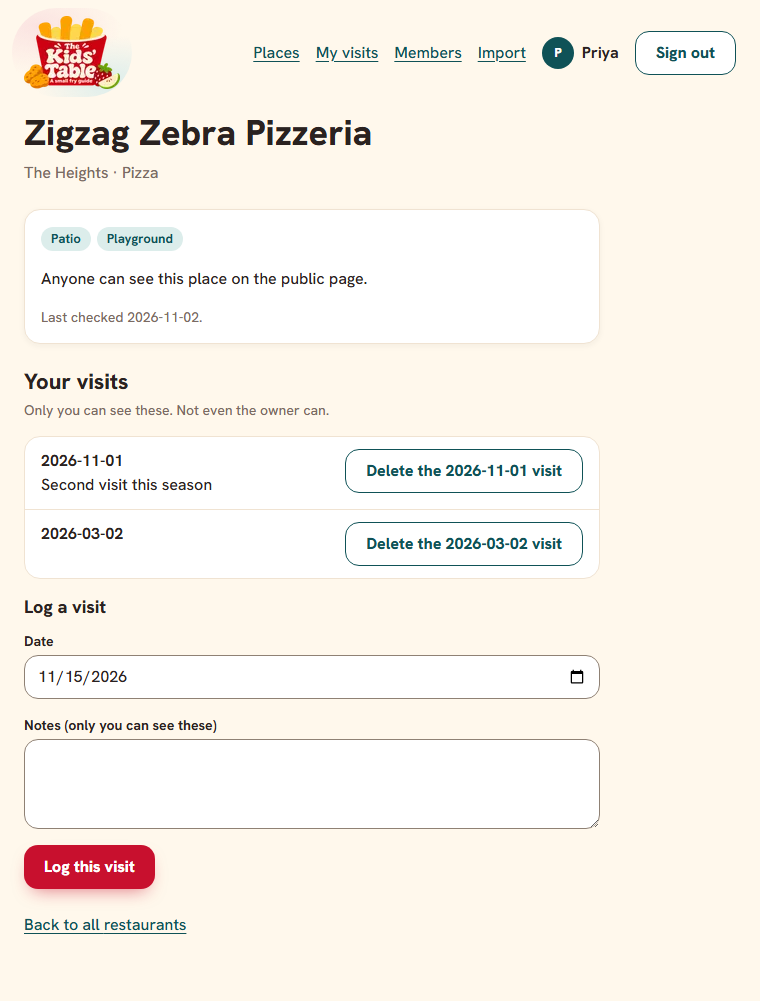
Try these in order:
- Log a visit with a date from last week and a note. It appears at the top of the list, and the notes box clears.
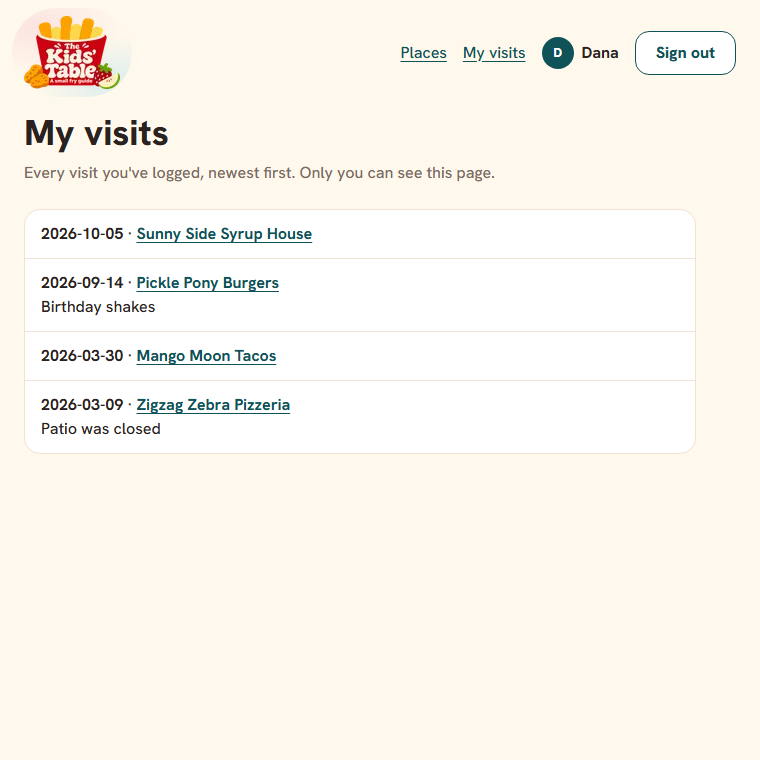
- Open My visits in the header. Every visit you've logged is there, across all the restaurants, with each name linked.
- Try to log a visit in the future. You can't pick one in the date box. If you could, the server would refuse it anyway, and keep your note so you don't have to type it again.
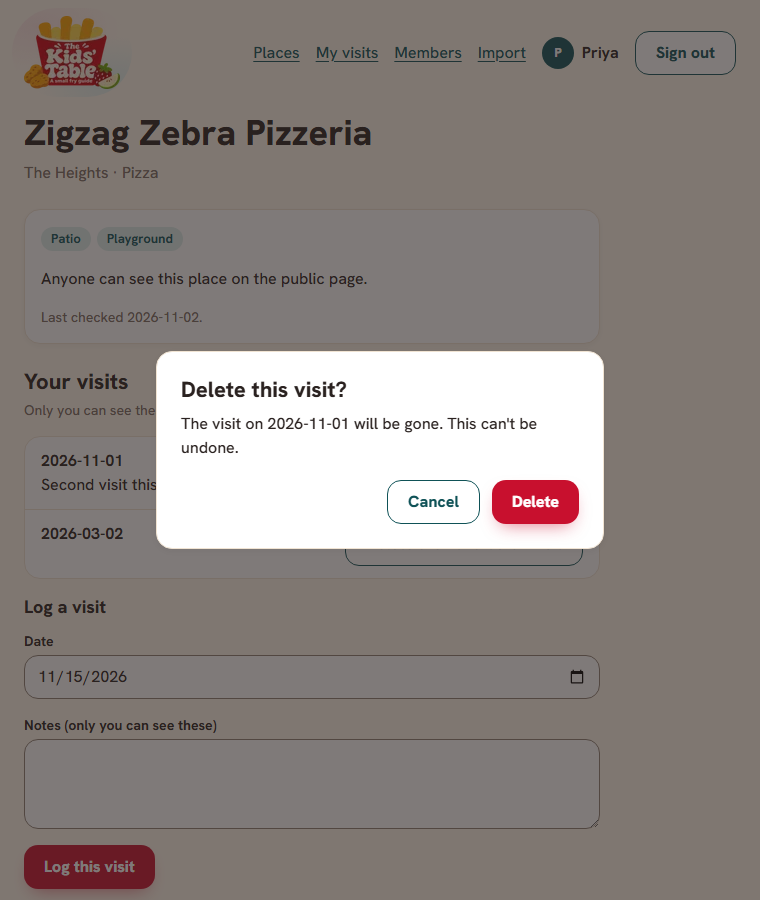
- Press Delete on one. The app asks first.
How a visit stays private
This is the part worth understanding, because it applies to any app with private records. The privacy doesn't come from a check at the end that says “is this person allowed to see that?” It comes from never being able to ask for someone else's data in the first place.
Every query starts from the signed-in person
Every function that reads or changes visits takes the signed-in person's id, and every database query begins with it. There is no function in the app called “get all visits” or “get a visit by its id.” If a mistake is made on a page, the worst it can do is ask for your own visits again.
The owner is someone else
The owner can approve people, remove them, and choose what's public. None of that includes reading their notes. The owner's own visits page shows the owner's own visits, and the page says so. We checked this with the owner's account, because that's the account people assume can see everything.
Who a visit belongs to never comes from the form
When you log a visit, the app takes your id from your sign-in, not from the form. We added a hidden field named
userId, set to another member's id, and sent it. The visit was saved under the person who was signed in.Delete can only reach your own
Deleting a visit says “delete the visit with this id, and owned by this person.” A visit's id isn't a secret, so we tried it: another member's browser, the owner's browser, a stranger, and someone waiting all sent a delete for Dana's visit. It was still there. Then Dana sent the same request, and it worked. That last step is the one that proves the others weren't just requests that never arrived.
// Both lines start from the signed-in person's id. Nothing here can reach anyone else's visit.
collection.find({ userId, restaurantId })
collection.deleteOne({ _id: visitId, userId })
Check the raw page, not just what you can see
It's easy to hide something on the screen and still send it to the browser. So the test doesn't only look at the page. It fetches the raw page the server sends to another member, including the data Next.js tucks inside it, and searches for every note that belongs to someone else. On the reference app, not one appeared. A stranger's view of the public page was checked the same way.
If it doesn't work
A button says “An unexpected response was received from the server.” Open the same page in a regular browser such as Edge or Chrome. The small browser built into some code editors doesn't always send a button's request to the app, so the app never sees it, and the page shows this error. If it works in Edge or Chrome, nothing is wrong with your app.
The date box is empty when the page loads. It fills in a moment after the page appears, from your browser's clock. If it stays empty, JavaScript didn't load. Reload the page.
“That doesn't look like a real date.” The date must be a real day on the calendar, such as 2026-10-19. A date like February 31 is refused.
You see someone else's visit. This should never happen, and if it does, stop and fix it before anything else. Ask Claude to show you every place the app reads visits, and check that each query starts with the signed-in person's id.
A visit you deleted is still on the page. Reload. If it's still there, the delete didn't run. It only works for visits you logged.
What Claude made
lib/visitRules.tschecks a date and a note with plain functions and ten tests.lib/visits.tsis the only place the app reads or writes visits. It has four functions, and every one takes the signed-in person's id.app/places/[id]gained the visits section, its form, and the actions behind it.app/visitsis the My visits page, and the header gained a link to it.
Checkpoint
0 of 5Next step: visits are yours alone. Reviews are for the group. In Chapter 15, you'll add one review per person per restaurant, show the group's average, and give the owner control over what the public can see.
Last checked November 15, 2026. Software screens and free-plan limits change. If something here doesn't match what you see, the official link in the chapter is the source to trust.