Chapter 13 · Part 3: Make it yours
Open up the members' area
Until now, the people you approved could sign in and see nothing more than a stranger. This chapter gives them somewhere to go: every restaurant, including the private ones, and a way to add the places they find.
You already decided the rules in Chapter 8. Members see everything. A restaurant is found by searching before it's added. The same place is never in the list twice. Now they become code.
Who can see what
| Who | The public page | The members' list and add page |
|---|---|---|
| A stranger | Public places only | Sent to sign in |
| Someone waiting | Public places only | Sent to the waiting screen |
| An approved member | Public places only | Every place, with the private ones marked |
| The owner | Public places only | The same as a member, plus Members and Import |
Notice the public page stays the same for everyone, even a signed-in member. It only ever shows what you chose to make public. The members' list is a different page.
1. Ask Claude Code to build it
Save the phase plan
Save this in your
planfolder as13-members-area.md.plan/13-members-area.md# Phase 13: open up the members' area Read `plan/00-app-plan.md`, `plan/08-data-model.md`, `plan/11-public-page.md`, `plan/12-add-sign-in.md`, `plan/design-system.md`, and `plan/screen-checklist.md` first. This phase gives approved members a place to see every restaurant, including the ones that aren't public, and to add new ones. ## Goal Approved members can list and search every restaurant, open one, and add a new one by searching first. Strangers and people who are still waiting can do none of it. Photos are not part of this phase. ## What to build - **A members-only list at `/places`.** It shows every restaurant, private ones included, each marked "Members only" if it isn't public. It uses the same search and filters as the public page, and its choices offer every item from the settings file. Anyone who isn't an approved member is sent away before the database is asked for anything. - **The member filter, as a plain function with tests,** in `lib/publicFilters.ts`. It must start from the public filter and remove only the "public" condition, so a search means exactly the same thing in both places, and an address still can't add conditions of its own. - **One restaurant's page at `/places/[id]`.** It shows the name, area, food, features, whether it's public, and when it was last checked. An id that isn't a real id, or that matches nothing, shows the not-found page. Never put the id into a database query before checking its shape. - **Search-first adding at `/places/new`.** The person types a name first. The page shows places that match ("Is it one of these?"). Only if they choose "None of these" does the add form appear, with the name filled in. - **The add form:** name, area, food, and features. Area and food are required and chosen from the lists. Features are chosen too. A new place always starts as members-only, and the form can't change that. - **The checks as plain functions with tests,** in `lib/newPlace.ts`: tidy the name, require letters or numbers, limit its length, require an area and food that are on the lists, refuse any feature that isn't, and cope with values that aren't text. - **The add action checks for itself** that the caller is an approved member. It sets "who added it" from the signed-in person, never from the form. The same name in the same area is refused by the database's unique index, and the answer links to the place that already exists. The same name in another area is a different place. - **Keep what the person typed** when the form shows an error. React clears a form after an action, so send the answers back and start the fields from them. - **A "Places" link in the header** for approved members. ## Rules for this phase - Check who's calling inside every server action. Don't rely on the form being hidden. - Treat every value from the browser as untrusted: ids, text, and anything extra that gets added to the form. - The public page must still show only public places, even to a signed-in member. - No new color or shape: use the design system. One tomato button per screen. - Tell me what each command does before you run it. Use the demo data, not my real database. ## Done when - `npm test` passes, including the new tests. - A stranger and a waiting person are sent away from `/places`, `/places/new`, and any place's page. - A member sees all eight demo places, with the three private ones marked, and a filter for Play area finds three places. - The public page, signed in as a member, still shows only the five public places. - Searching "zigzag" on the add page offers Zigzag Zebra Pizzeria. A name nothing matches offers the form. - An empty area, an area that isn't on the list, and extra fields added to the form do nothing. A valid place is saved as members-only, added by the signed-in member. - The same place again (any capitals, any extra spaces) is refused with a link. The same name in another area is saved. - Replaying the add action with no sign-in, or while waiting, saves nothing. Replaying it as the member does save (so the refusals are real). - At 390px wide there's no sideways scroll, and an accessibility scan finds nothing. - `npm run lint` and `npm run build` pass. ## Out of scope Photos, reviews, visits, changing a place after it's added, and the owner choosing what's public. Those come later.Paste the prompt
Keep Claude Code in the mode where you read each request. Stop your own dev server first (Ctrl+C), because Claude may build the app to test it, and a build can upset a running dev server. The last sentence asks Claude to try to break its own work, which is the habit from Chapter 12.
Prompt for Claude CodeRead plan/00-app-plan.md, plan/08-data-model.md, plan/11-public-page.md, plan/12-add-sign-in.md, plan/design-system.md, plan/screen-checklist.md, and plan/13-members-area.md in this folder. Then do phase 13. Before you run any command, tell me in plain English what it does. Use the demo data, not my real database. When you finish, tell me how to try it, and then try to break it the way a stranger or a waiting person would.
2. Try it
Start the app, sign in as an approved member, and open Places in the header. If you only have the owner account, that works too, because the owner is a member as well.
npm run dev
What you should see
A heading, a search form, and a grid of every restaurant. The ones that aren't public carry a Members only tag. Each name is a link.
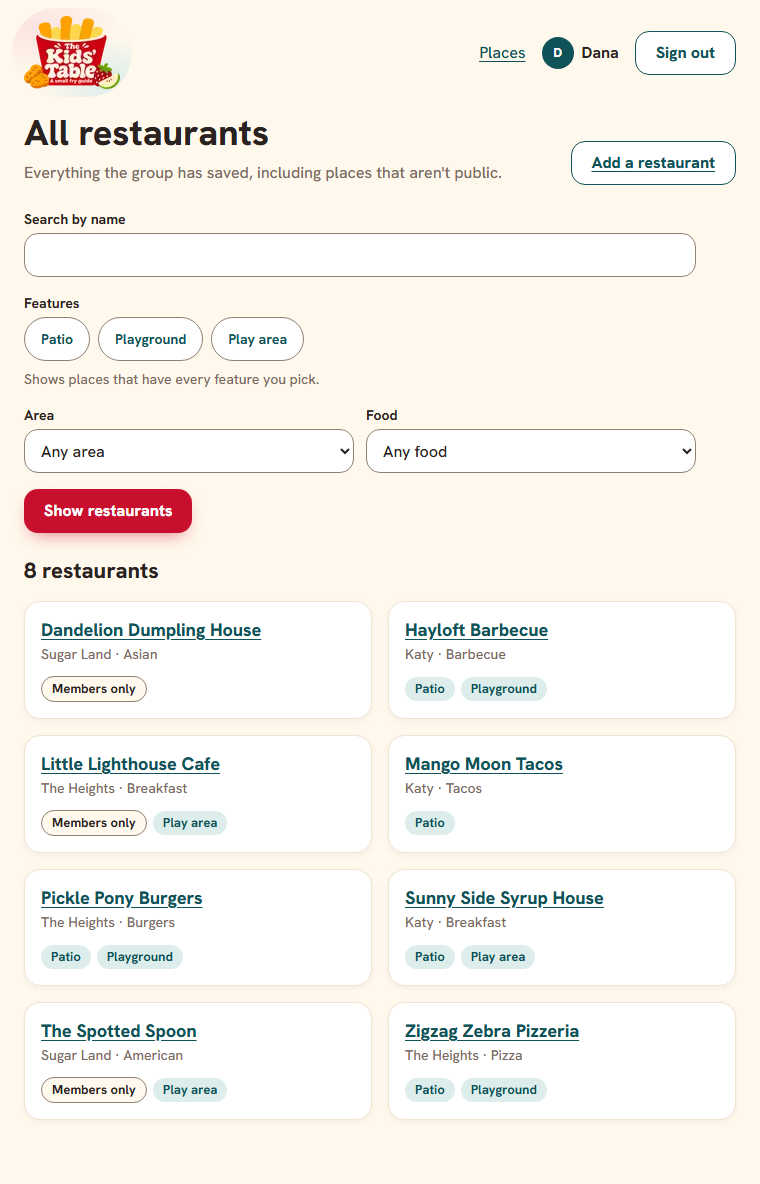
Try a few things:
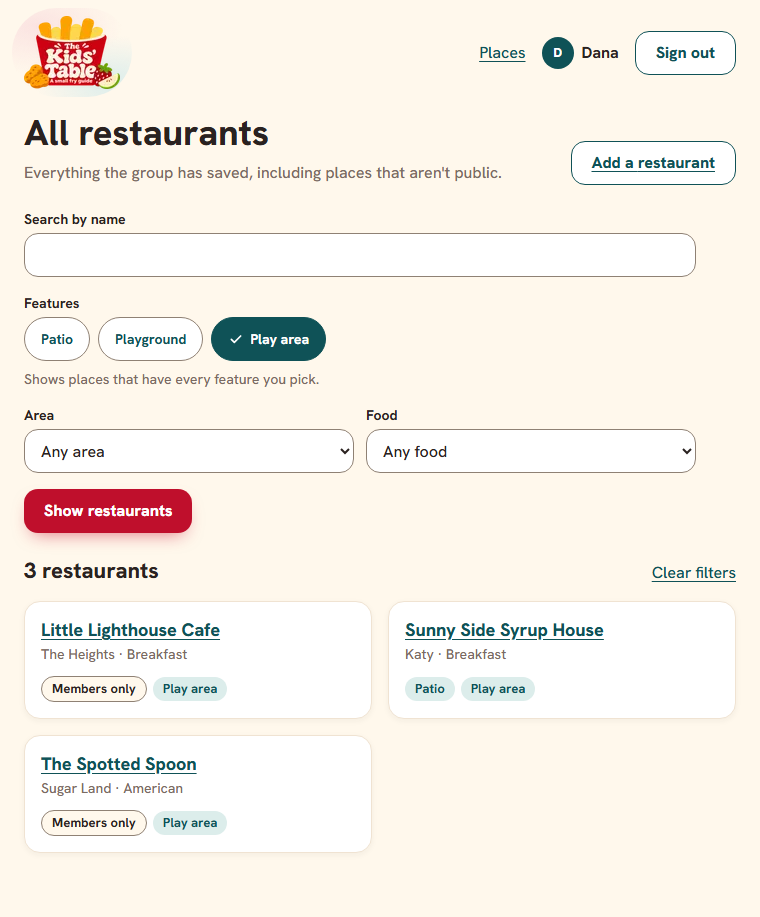
- Tap Play area and press Show restaurants. You get three places, and two of them are private. On the public page, the same filter finds only one.
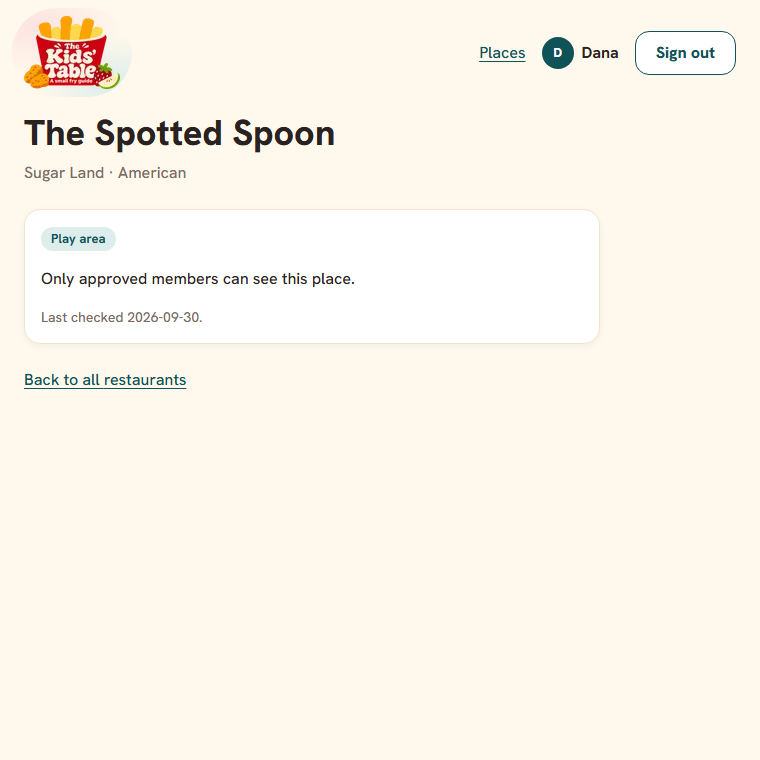
- Open a private place, like The Spotted Spoon. The page says Only approved members can see this place.
- Sign out and type
/placesinto the address bar. You're sent to the sign-in page.
3. Add a place by searching first
Open Add a restaurant. The page doesn't start with a form. It starts with a question, what's it called? That's the Chapter 8 rule at work. Most places someone wants to add are already in the list, and a search is the cheapest way to find out.
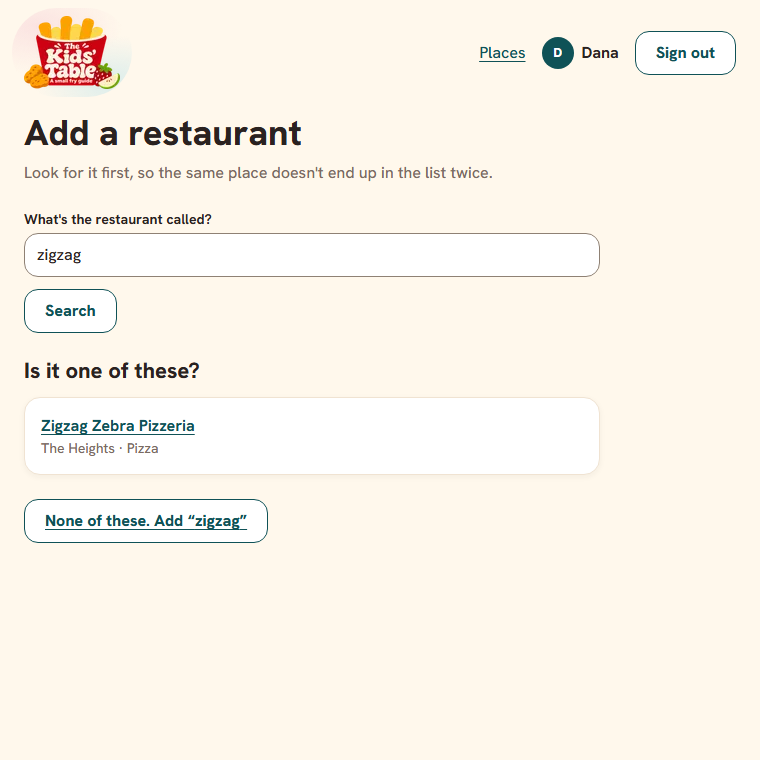
Only if you press None of these does the add form appear, with the name already filled in. Area and food are required and come from your lists, and features are chosen, not typed. That keeps the filters on every page working.
New places start out members-only
Whatever a member does, a new place is not public. Deciding what a stranger can see is the owner's job, and you'll build that control in Chapter 15. The form says so, in a line under the features.
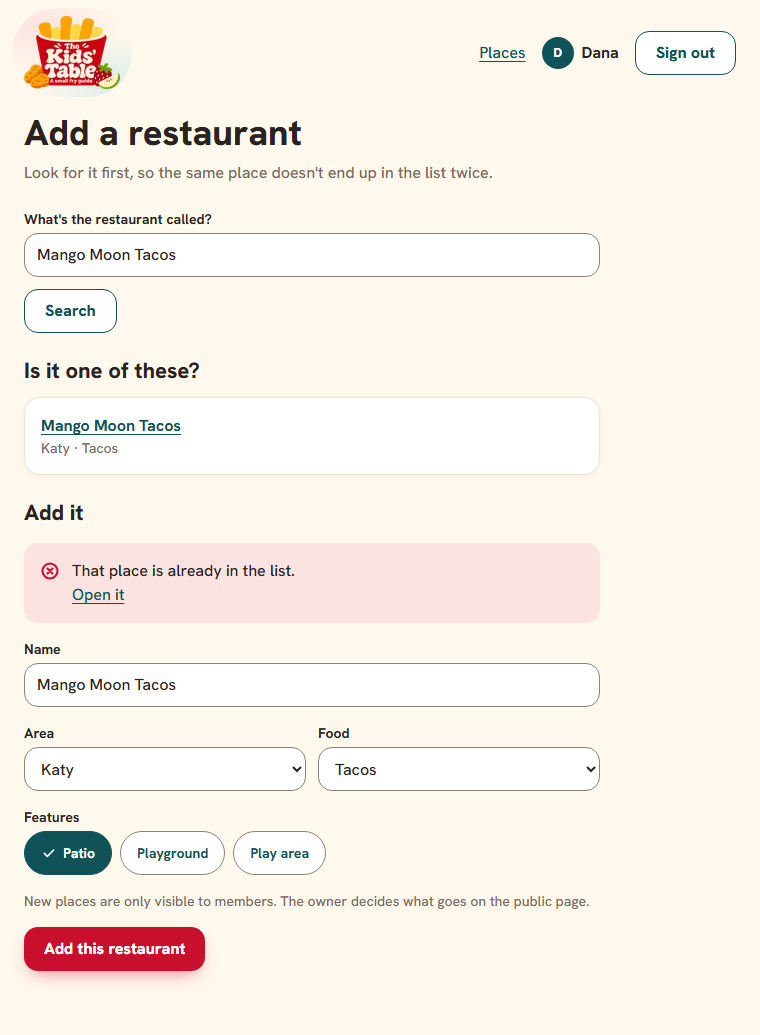
Try adding a place that's already there. Search for Mango Moon Tacos, press None of these anyway, and fill in the form with Katy as the area. The app says so, and links to the one that already exists:
What stops the same place being added twice
Searching first is a courtesy. It isn't protection, because anyone can skip the search and go straight to the form. The real guard is the rule you gave the database in Chapter 10: one restaurant per name and area. Databases call a rule like that a unique index, and the database itself refuses a second place that breaks it. We added a test place, then tried the same name again, and then again with extra spaces and different capitals. Both repeats were refused as the same place, because the app compares a simplified version of the name, with capitals, spaces, and punctuation ignored.
The same name in a different area is a different place, and it's accepted. That's how a chain with a location in Katy and another in Sugar Land works. What the app can't do is know that Zigzag Pizza and Zigzag Zebra Pizzeria are the same restaurant. A person can, which is why the search is the first thing they see.
How it keeps the private places private
Every page checks first
The members' pages ask “is this an approved member?” before they read a single place from the database. A stranger or a waiting person is sent away, and nothing is fetched on their behalf. Hiding the Places link doesn't protect anything, so we tested the real thing: typing the address. We tried it as a stranger and as a waiting person, for the list, the add page, and a single place's page.
The members' search is the public search, minus one condition
You wrote the public search in Chapter 11 with great care: every value in the address is checked, and the filter always includes
public: true. The members' search starts from that exact function and removes only that one condition. So a word typed in the search box means the same thing in both places, and an address still can't add conditions of its own. A test checks that everything else in the two filters is identical.A place's page treats its address as untrusted
The address of a place's page contains an id that anyone can edit. The app only accepts something that has the exact shape of a real id before it goes near the database. We tried a made-up word, an id of the right shape that matches nothing, and a twelve-character word, which looser checks wave through. Each one shows the not-found page and no place.
The add action checks for itself, again
You met this idea in Chapter 12. The form is one way to ask the server to add a place, and anyone who copies the request can ask without it. So the action checks who is calling and then checks every value as if a stranger sent it:
export async function addPlace(previous, formData) {
  const member = await memberForAction();        // an approved member, or nothing
  if (!member) return { message: "Sign in as an approved member to add a place." };

  const checked = checkNewPlace(/* name, area, food, features */, settings);
  if (!checked.ok) return { message: checked.message };

  // who added it comes from the signed-in person, never from the form
  const result = await insertRestaurant({ ...checked.place, createdBy: member.id });
  ...
}
We tested it by editing the form in the browser: removing the “required” marks, choosing an area that isn't on the list, and adding hidden fields named public, createdBy, and photos. The server refused the empty and the unknown values, and ignored the extra fields. The place that was saved was members-only, added by the person who was signed in.
Then we copied the add request and sent it with no sign-in and as someone still waiting. Nothing was saved. And we sent it again as the approved member, and it was. That last step matters. It proves a refusal means your check worked, and not that the request went nowhere.
Don't let an error wipe the form
This one bit us. After an action finishes, React clears the form's fields. So a person who forgot to pick a food would see an error and an empty form. The fix is to have the action send back what the person typed, and start the fields from that. It's a small thing, and it's the difference between an app people finish forms in and one they give up on. The test that found it was just trying the duplicate case a second time.
If it doesn't work
A button says “An unexpected response was received from the server.” Open the same page in a regular browser such as Edge or Chrome. The small browser built into some code editors doesn't always send a button's request to the app, so the app never sees it, and the page shows this error. If it works in Edge or Chrome, nothing is wrong with your app.
The list is empty. You have no restaurants yet. Import the clean sample from Chapter 10, signed in as the owner.
There's no Places link in the header. You're signed out, or you're still waiting for approval. Only approved members, and the owner, see it.
The form won't send, and nothing says why. The browser is stopping you before the app is asked: Area and Food are required. Look for a field that still says “Choose.”
You added a place that was already there, with a slightly different name. The app can only tell that two names are the same when they match once spaces, capitals, and punctuation are ignored. If two different spellings of one restaurant get in, the owner has to merge them by hand. Searching first is how you avoid it.
What Claude made
app/placesholds the members' list, one place's page, and the add flow, which is a search page, a form, and the action behind it.lib/newPlace.tschecks a new place with plain functions and eight tests.lib/publicFilters.tsgained the members' version of the filter.lib/restaurants.tsgained three functions: list for members, find one by id, and add one.lib/session.tsgainedmemberForAction, the check an action runs before it does anything for a member.- The public page's search form now takes the page it sends its choices to, so both lists share one form.
What's still missing
The members' area has no photos. Photos need somewhere to keep files, and that's a different kind of service from your database, with its own account to set up. We left them out of this guide's app so it stays something you can finish, and the app works without them.
Checkpoint
0 of 5Next step: members can see and add places. Next they need records of their own. In Chapter 14, you'll log visits, which stay private to the person who logged them. In Chapter 15, you'll add reviews, one per person per restaurant, and the owner's control over what goes public. In Chapter 16, you'll put it all online for real.
Last checked November 15, 2026. Software screens and free-plan limits change. If something here doesn't match what you see, the official link in the chapter is the source to trust.