Chapter 15 · Part 3: Make it yours
Share with your group
Visits are private. Reviews are the opposite: they're the reason a group shares a list at all. Is it any good? What did Dana think? This chapter adds the group's reviews, and then gives the owner the one control that matters most: what a stranger can see.
The rules from Chapter 8
| The rule | How the app keeps it |
|---|---|
| One review per person per restaurant | A unique index in the database. Writing again replaces the first. |
| A rating is a whole number from 1 to 5. Not "4/5", not "great!", not stars. | The rating must be exactly one digit from 1 to 5. Anything else is refused. |
| The group reads each other's reviews | Every approved member sees every review. Strangers and people waiting see none. |
| The public page never shows reviews | No public query reads them. A test checks the raw page. |
| The owner decides what's public | Only the owner's actions can change it, and they check again. |
1. Ask Claude Code to build it
Save the phase plan
Save this in your
planfolder as15-share-with-group.md.plan/15-share-with-group.md# Phase 15: share with your group Read `plan/00-app-plan.md`, `plan/08-data-model.md`, `plan/12-add-sign-in.md`, `plan/13-members-area.md`, `plan/14-visits.md`, `plan/design-system.md`, and `plan/screen-checklist.md` first. This phase adds the group's reviews, and gives the owner control over what a stranger can see. ## Goal Every approved member can write one review per restaurant, and read everyone else's. The group's average rating shows on each restaurant and in the list. The owner can show a restaurant on the public page or take it off, and can see which restaurants are due for a fresh look. The public page never shows reviews. ## What to build - **The rules as plain functions with tests,** in `lib/reviewRules.ts`: a rating is exactly one digit from 1 to 5, as text, and nothing else ("4/5", "great!", "4.5", "0", "6", " 4", and "04" are all refused). The note is optional, trimmed, and limited to 500 characters. Values that aren't text must never crash it. Also: the group average to one decimal place with the count, and "due for a fresh look" meaning the place was last checked more than six months ago, or never. - **A `reviews` collection** with one document per review: which restaurant, who wrote it, the rating, the note, and when it was created and last changed. Add a unique index on restaurant and person, so the database itself refuses a second review by the same person. Saving again replaces the first, and keeps the original created time. If two saves arrive at the same moment, retry once. - **Database functions in `lib/reviews.ts`.** Reviews by a person who has been removed are hidden and left out of every average. If the person is let back in, their reviews return. A place's id is checked for the exact shape of a real id before it goes into a query. - **On each restaurant's page, "What the group thinks":** the average and count, then every visible review with the writer's name and rating, with the signed-in person's marked "(you)". Below it, the person's own review form. It starts blank, or from their existing review. Saving a second time replaces it. They can delete their own review, after a confirmation. Notes show as plain text. - **In the list,** each restaurant shows its average and review count, if it has any. - **Owner controls on a restaurant's page,** visible only to the owner: show on the public page or take off, with a plain statement of what the public sees, and "Mark as checked today". In the list, only the owner sees a "Due for a fresh look" tag. - **The actions check for themselves.** The review actions need an approved member. The owner actions need the owner. The person a review belongs to is the signed-in person, never a value from the form. The visibility action accepts only "yes" or "no". Deleting a review deletes only the caller's own. ## Rules for this phase - The public page never shows a review, a rating, a note, or a visit, even for a restaurant the owner has made public. - Check who's calling inside every server action. Treat every value from the browser as untrusted: ratings, notes, ids, and any extra field added to the form. - No new color or shape: use the design system. One tomato button per screen. - Tell me what each command does before you run it. Use the demo data, not my real database. ## Done when - `npm test` passes, including the review rules. - With the demo data, Zigzag Zebra Pizzeria shows "4.3 out of 5 from 3 reviews", and Mango Moon Tacos shows "4 out of 5 from 3 reviews". - Saving a review twice leaves one review, with the new rating and the original created time. - Each bad rating ("4/5", "great!", "0", "6", "4.5", none, a script), a note over the limit, a place that doesn't exist, and an id of the wrong shape saves nothing. - A note containing HTML is shown as text and doesn't run. - Replaying the review actions signed out or while waiting changes nothing. Replaying as the member works, and saves under that member even if the form names someone else. Delete removes only the caller's own review. - A removed member's reviews disappear from the page and the averages, and return when they are let back in. - A member, someone waiting, and a stranger can't show a place on the public page or mark it checked, even by sending the request by hand. The owner can. Anything other than "yes" or "no", and a bad id, does nothing. - After the owner shows a place publicly, a stranger sees its name and features and no review text or rating. Taking it off removes it again. - With the demo data, exactly one place is due for a fresh look: Sunny Side Syrup House. Marking it checked clears it. A member never sees the tag. - At 390px wide there's no sideways scroll, and an accessibility scan finds nothing. - `npm run lint` and `npm run build` pass. ## Out of scope Editing or hiding someone else's review, replies, photos, and a public view of ratings. Those aren't built.Paste the prompt
Keep Claude Code in the mode where you read each request. Stop your own dev server first (Ctrl+C), because Claude may build the app to test it, and a build can upset a running dev server.
Prompt for Claude CodeRead plan/00-app-plan.md, plan/08-data-model.md, plan/12-add-sign-in.md, plan/13-members-area.md, plan/14-visits.md, plan/15-share-with-group.md, plan/design-system.md, and plan/screen-checklist.md in this folder. Then do phase 15. Before you run any command, tell me in plain English what it does. Use the demo data, not my real database. When you finish, tell me how to try it, and then try to break it: bad ratings, a second review by the same person, someone who isn't the owner trying to change what's public, and a stranger looking at the public page after the owner makes a place public.
2. Try it
npm run dev
Open a restaurant. Under the details, a new section, What the group thinks, shows the average and every review.
What you should see
The group's average, such as 4.3 out of 5 from 3 reviews. Then each person's rating and note, with yours marked (you). Then your own review form, ready to fill in, or already filled in if you've written one.
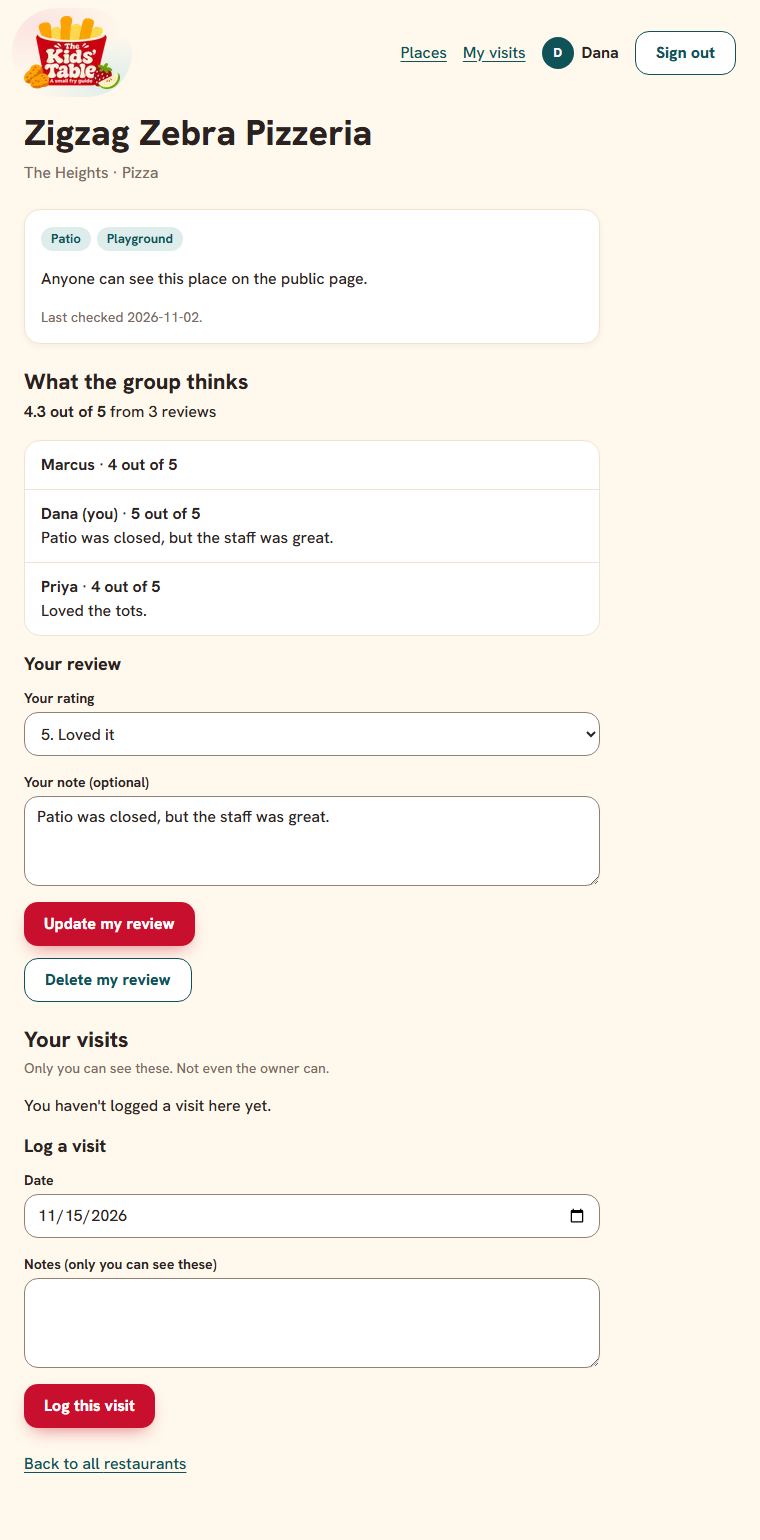
Try these in order:
- Write a review of a place you haven't reviewed. Pick a rating and add a note if you like.
- Change the rating and press Update my review. You still have one review, not two, and the average moves.
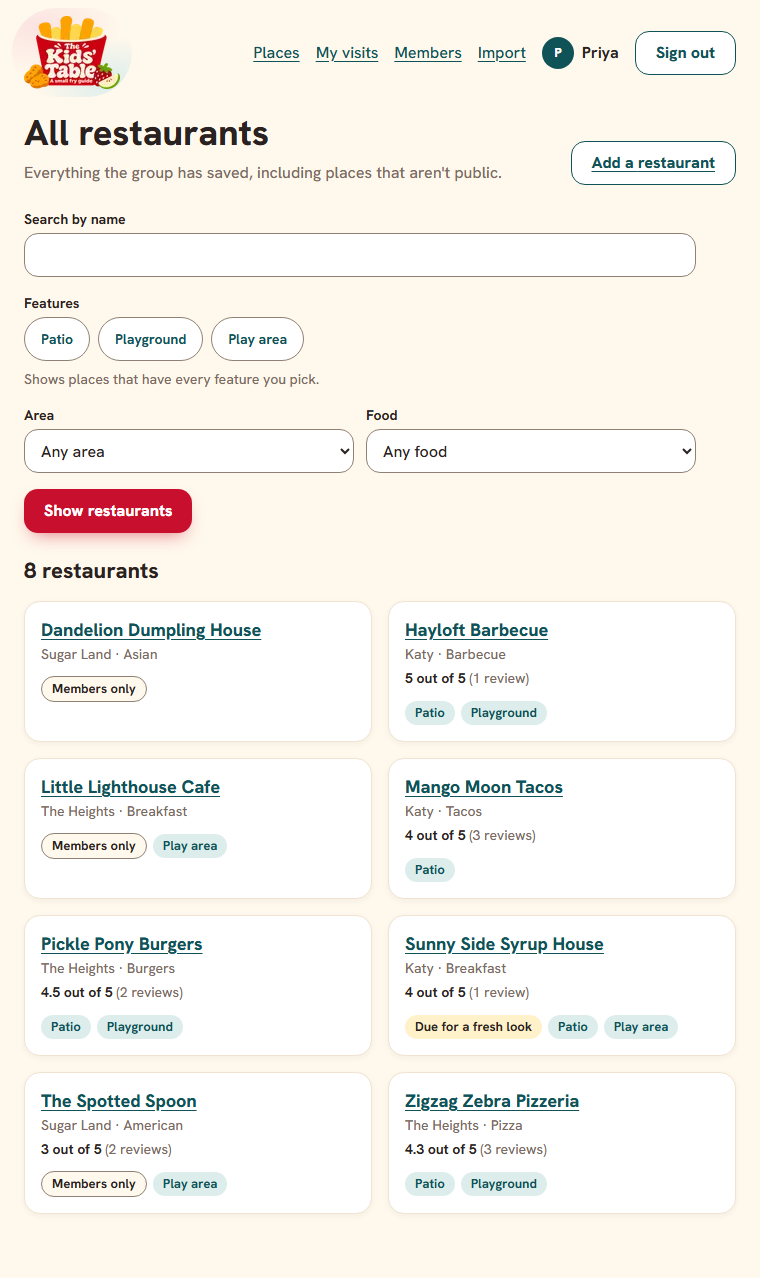
- Open the restaurant list. Each place with reviews shows its average and how many people it's based on.
- Press Delete my review. It asks first.
Why the rating is a drop-down
A rating you type can be “4/5,” “four,” or “great!” A drop-down can only be one of five choices, and the app checks again on the server, because the server can't see what the browser showed. Each choice has a few words beside the number, so a 3 means something the same to everybody.
One review each, even if you tap twice
You've seen this pattern before: a check in code is polite, and a rule in the database is the one that holds. Two quick taps on Save could both ask “does this person have a review yet?” at the same instant, both hear “no,” and both write one. So the database refuses the second with a unique index on restaurant and person, the same kind of rule as the one that keeps a place from being added twice. When that happens, the app tries once more, and this time it finds the first and updates it.
We tested it by saving twice and checking that one review was left, with the newer rating, and with the time it was first written kept.
Bad ratings
We sent ten kinds of bad input straight to the server, skipping the form: 4/5, great!, 0, 6, 4.5, no rating at all, a rating that was really a command (5; db.dropDatabase()), a note of 501 characters, a restaurant that doesn't exist, and an id of the wrong shape. None of them saved anything. The rating test is deliberately stricter than it needs to be: exactly one digit from 1 to 5, as text. Looser tests accept things like 04 and 4.0, and you don't want to wonder what those mean later.
A note can't carry code
Someone could type <img src=x onerror=alert(1)> into a note, hoping it runs in other people's browsers. We tried exactly that. It appears on the page as the literal text, and nothing runs, because the page shows notes as plain text and never as markup. Keep it that way: don't ask for a note “with formatting” without asking what it would take to keep this safe.
When someone is removed
In Chapter 12, you made it possible to remove a member. What happens to their reviews? The app hides them, and leaves them out of every average. If you let the person back in, the reviews return. We checked both directions with Marcus: remove him and Mango Moon Tacos drops from 3 reviews to 2, and let him back in and it goes back to 3. You decide this in advance, because the other choice, deleting a person's writing when you remove them, can't be taken back.
3. The owner decides what a stranger sees
Sign in as the owner and open a restaurant. A new card appears, headed Owner controls. It has two things in it.
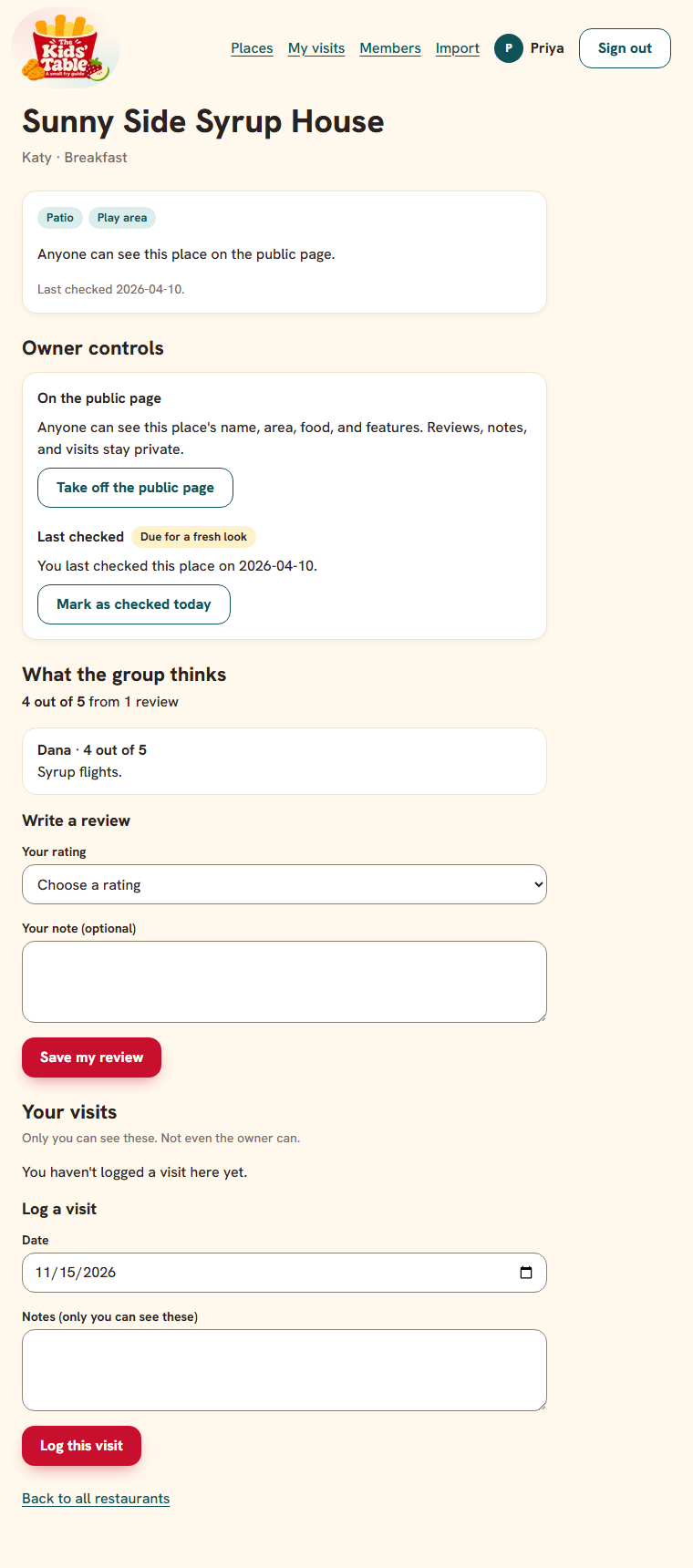
On the public page. One button shows the place to strangers or takes it off, and a plain sentence says exactly what a stranger will see: the name, the area, the food, and the features. Reviews, notes, and visits stay private.
Last checked. Restaurants change. A place that had a patio in April may not have one now. After six months, a listing is due for a fresh look, and a small yellow tag says so in the owner's list and in this card. Members never see it. Pressing Mark as checked today clears it.
Now make a private place public, such as The Spotted Spoon, and open the public page signed out. The place appears, with its name and features and nothing else.
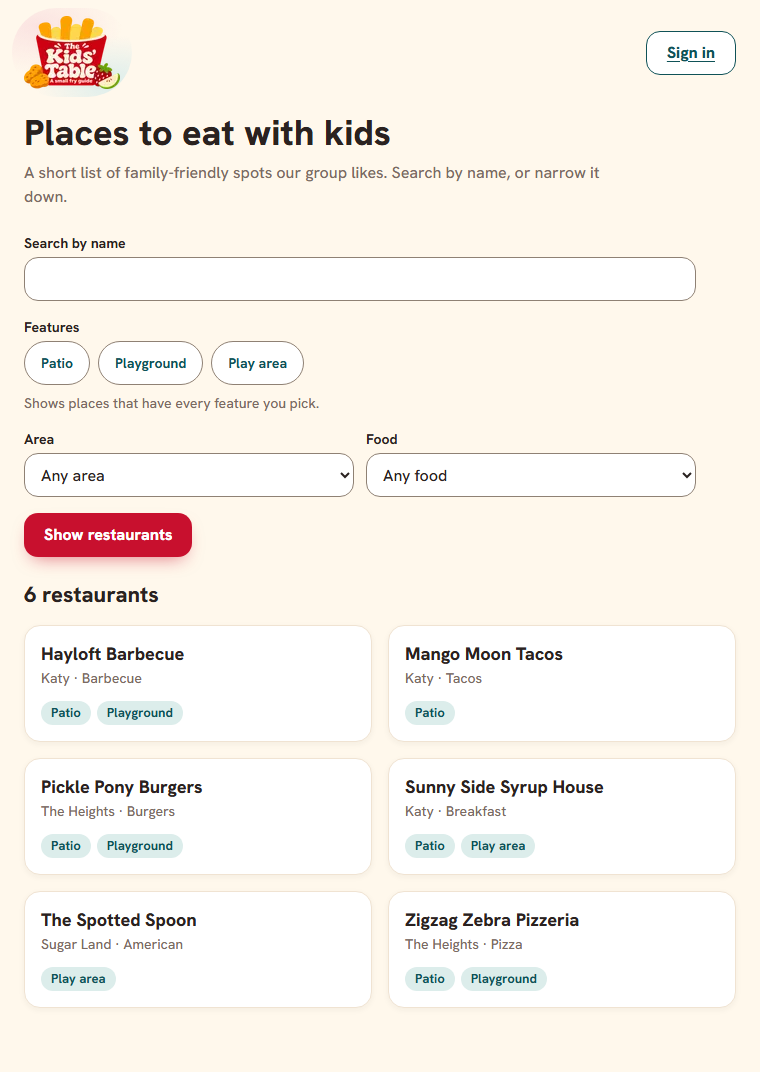
We checked the raw page for the words from every review in the sample data, and for the phrase “out of 5.” None appeared, before or after the place was made public.
Who can change what's public
The public page is the part of your app that a stranger can see, so the controls over it get the same treatment as everything else in this guide. The action checks that the caller is the owner. We tried it as a member, as someone waiting, and as a stranger, with the request copied by hand. The place stayed private every time. The owner sending anything other than yes or no, or a bad id, changed nothing either. Then the owner sent a yes, and it worked.
Only send what you mean to
The owner's request to show a place carries one field that matters: yes or no. We added a field to rename the place and one to change its features, and the app ignored them. An action should read only the fields it expects, and nothing else the browser happens to send.
If it doesn't work
A button says “An unexpected response was received from the server.” Open the same page in a regular browser such as Edge or Chrome. The small browser built into some code editors doesn't always send a button's request to the app, so the app never sees it, and the page shows this error. If it works in Edge or Chrome, nothing is wrong with your app.
The average looks wrong. It only counts reviews from people who are currently approved, so a removed member's review is left out. Check the Members page.
There are no Owner controls. You're signed in as a member, not the owner. Only the account that matches OWNER_EMAIL has them.
A place you made public isn't on the public page. Reload the public page. If it's still missing, look at the card on the restaurant's page: it should say “Anyone can see this place's name...” and offer to take it off.
You can see a review on the public page. Stop, and fix it first. Ask Claude to find every place the public page reads data and check that none of them reads reviews.
What Claude made
lib/reviewRules.tschecks a rating and a note, works out the average, and decides when a place is due for a fresh look. Eight tests cover it.lib/reviews.tsreads and writes reviews, with the unique index and the rule about removed members.app/places/[id]gained the group's reviews, your own review form, and the owner's controls, plus the actions behind them. Each action checks who is calling.- The restaurant list shows averages, and the owner's list shows which places are due.
Checkpoint
0 of 5Next step: the app works on your computer. In Chapter 16, you'll put it online for real: add its settings to Vercel, let it reach your database, and run a final check against the live address.
Last checked November 15, 2026. Software screens and free-plan limits change. If something here doesn't match what you see, the official link in the chapter is the source to trust.