Space Maker
The seating chart that already knows who's here.
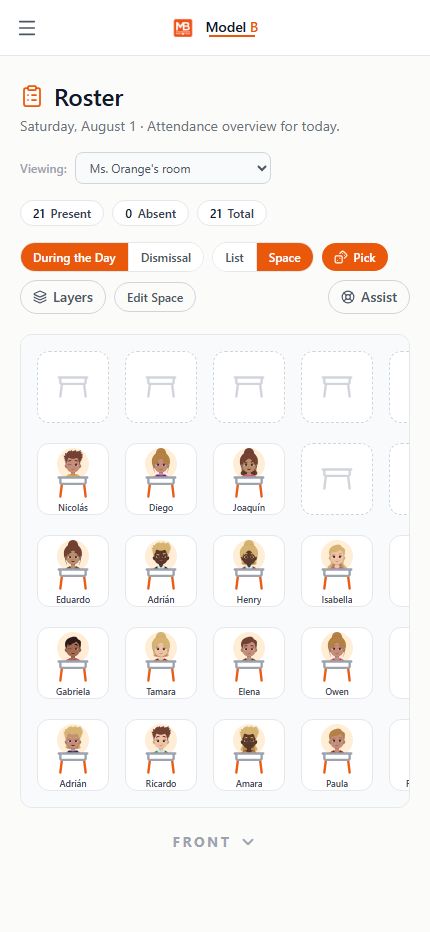
Build a real room layout once, then use it as the daily attendance tool. Tap a seat to mark a student absent, and the icons update instantly for dismissal and drills.
Room 214 · Chart View
Space Maker
Sample view
Present24 students seated. 2 empty desks.
AbsentOne student marked absent. Grayed out, no re-entry needed.
PickedRandom student picked. Fair rotation, no repeats this round.
What it does
One room. One chart. Every purpose it needs to serve.
Build it your way
Common layout templates, or drag desks freehand on a snap grid.
The chart is the attendance sheet
Tap a seat to toggle absent, the same gesture a substitute uses on their copy of the same chart.
One room, every class
Rotation teachers get a separate seating layout per class on the same physical chart, no duplicate rooms to maintain.
Why schools trust it
Saves without being asked, and never forgets who's here.
Saves without being asked
Autosave and a live status indicator, so no layout ever needs to be manually exported or re-sent.
Fair, and it remembers
The random student picker won't repeat a name until everyone present has had a turn.
Substitutes see the same room
A cold-covering substitute gets the identical chart a teacher would use, with attendance built in.
One tap, two systems updated
Marking a seat absent updates dismissal status automatically. No separate attendance step.
Space Maker ships inside Model B.
Part of the student operations suite: Dismissal and Classes.